
Devangi M.
Author
Build a Shopify Store with AI in 2026 (Complete Guide)
A practical six-step guide to using AI to create a Shopify store, add products, design your storefront, optimize images, configure essential settings, improve visibility, automate marketing, and manage your store after launch.
Learn how to build a Shopify store with AI in 2026, from generating your storefront and product content to marketing, SEO, analytics, and launch.
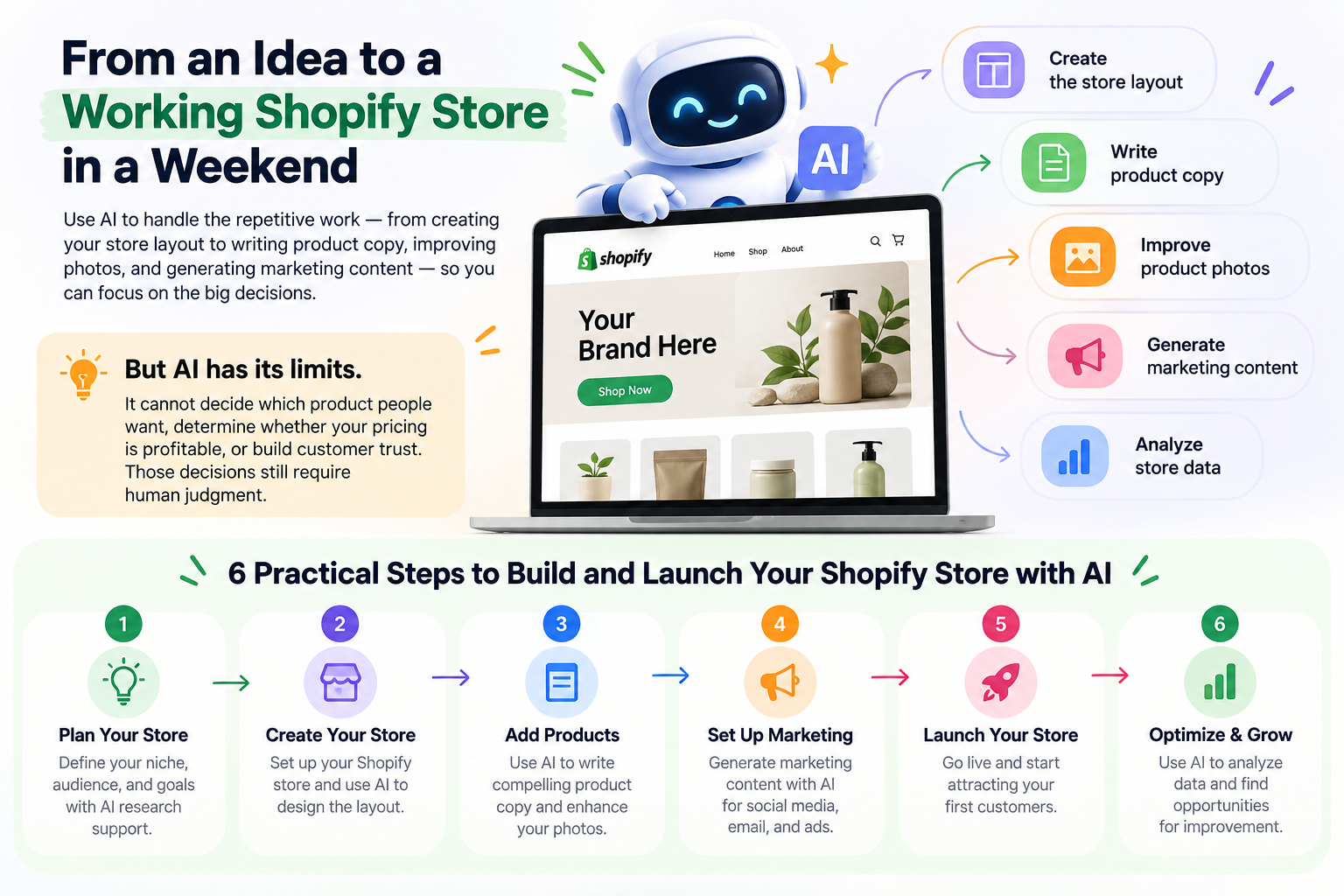
You can now go from an idea to a working Shopify store in a weekend, with AI handling much of the repetitive work. It can help create the layout, write product copy, improve product photos, generate marketing content, and analyze store data.
However, AI cannot decide which product people want, determine whether your pricing is profitable, or build customer trust. Those decisions still require human judgment.
This guide explains six practical steps for building and launching a Shopify store with AI, from planning and store creation to marketing, launch, and ongoing optimization.
01. Plan Your Store and Generate the First Version
Before you build your Shopify store, make three decisions that AI cannot make for you: what you are selling, who you are selling to, and whether the business can be profitable. Clear decisions give AI the information it needs to create a useful first version of your store.
- Define what you sell and who your target customer is.
- Calculate product, packaging, shipping, and payment costs to understand your margin.
- Choose the Shopify plan that fits your current business needs.
- Describe your product, audience, brand personality, tone, colors, and visual style in your AI prompt.
- Generate the first version of your storefront using a clear and specific description.
- Review the generated homepage, navigation, footer, and placeholder content.
A specific prompt produces a stronger starting point than a vague description. Give AI enough context about your customers, products, brand personality, and visual direction so the generated storefront has a clear purpose.
The goal at this stage is not to create a perfect store. Build a strong foundation that you can improve as you add products, images, content, and business information.
02. Add Products and Create Content
Once the first version of your store is ready, add your products and give AI accurate information to work with. AI can create product titles, descriptions, specifications, and other content, but the facts should always come from your business.
- Add product prices, variants, weights, and inventory information.
- Prepare product details such as materials, dimensions, uses, package contents, and care instructions.
- Use AI to create clear product titles and descriptions.
- Ask AI to organize product information into easy-to-scan sections.
- Review every AI-generated claim before publishing it.
- Remove information that cannot be verified.
- Group related products into useful collections.
- Write content that explains both product benefits and important specifications.
Good product copy should help customers understand what the product is, why they may want it, and what they will actually receive. Keep descriptions useful and specific instead of filling the page with generic AI-generated text.
03. Design Your Store and Product Images
AI can help shape your storefront design and improve product photography without requiring you to manually adjust every setting.
- Choose a theme that fits your products and photography style.
- Describe your preferred layout, colors, typography, and brand personality.
- Improve the homepage hero and place important products where customers can see them quickly.
- Add reviews and useful content sections to build trust.
- Keep typography, spacing, and colors consistent throughout the store.
- Check buttons and important content for readability and accessibility.
- Take product photos from multiple angles using natural light.
- Use AI to remove backgrounds or create simple product scenes.
- Compare edited images with the real product before publishing.
- Add accurate alt text to product images.
- Preview the complete store on mobile devices.
AI-generated product images should improve presentation without changing what customers believe they are buying. Your final images should accurately represent the real product.
04. Configure Payments, Shipping, Taxes and Store Policies
After the storefront and products are ready, configure the operational parts of your Shopify store. AI can guide you through these settings, but payments, shipping, taxes, and legal policies require careful human review.
- Enable an appropriate payment provider and understand the applicable payment fees.
- Set shipping rates such as flat-rate or free shipping above a specific order value.
- Review the tax requirements that apply to your business and location.
- Create refund, shipping, privacy, and terms pages.
- Make sure every policy accurately reflects what your business will actually do.
- Check that product prices, shipping charges, and taxes are displayed correctly.
- Place a complete test order before launching the store.
- Review the checkout experience and confirmation email.
This stage can directly affect revenue, customer trust, and compliance. Use AI to help understand the setup process, but make the final decisions yourself and verify every important setting before launch.
05. Improve SEO, AI Visibility and Marketing
Customers can discover your products through search engines, social platforms, and increasingly through AI assistants. Your store should provide complete, accurate, and readable information that makes your products easier to understand and discover.
- Create unique page titles and meta descriptions for important products and pages.
- Use customer-facing search terms instead of internal product codes.
- Publish useful articles that answer real customer questions.
- Complete product information such as category, material, size, color, weight, price, and shipping details.
- Make product information clear enough for both customers and AI systems to understand.
- Capture emails using a signup form and relevant first-order offer.
- Enable abandoned checkout recovery.
- Create a welcome email series.
- Use AI to draft social media content and marketing campaign ideas.
- Review marketing performance and spending regularly.
AI can generate large amounts of marketing content quickly, but generic content can make a brand feel less authentic. Review and adapt AI-generated emails, social posts, and campaigns so they match your own brand voice.
The goal is not to publish more content simply because AI makes it easy. Focus on useful content that answers customer questions, explains your products, and helps people make buying decisions.
06. Launch, Analyze and Manage Your Store with AI
Once your store is ready, launch it and use AI as an ongoing assistant. It can help analyze sales, identify unusual changes, answer questions about store performance, and support repetitive operational tasks.
- Confirm every product has a price, stock count, real photo, and verified description.
- Check that the homepage clearly explains what you sell and who it is for.
- Make sure the store works correctly on mobile devices.
- Connect and verify your custom domain.
- Confirm payments are active and complete a successful test order.
- Review shipping and tax settings.
- Publish refund, shipping, privacy, and terms pages.
- Enable welcome and abandoned checkout emails.
- Complete important SEO titles and meta descriptions.
- Review weekly sales and identify unusual changes.
- Monitor inventory so popular products do not run out.
- Identify products that receive many views but few purchases.
- Review marketing performance and customer behavior.
- Use real customer and sales data to guide future improvements.
A small store can potentially be built in a focused weekend when the business decisions and product information are already prepared. If time is limited, launch with fewer finished products rather than delaying the entire store.
Final Thoughts
AI has removed many of the slow and repetitive tasks involved in opening an online store. It can help with store creation, product content, design, images, SEO, marketing, and analytics, allowing business owners to move from an idea to a working Shopify store faster.
The strongest results still come from combining AI speed with human judgment. Start with a clear product and customer, launch a focused store, and use real customer and sales data to continuously improve the experience.
Recent Articles



Bhargav V.
Author
Magento 2 Security Patches: Complete Guide to Protecting Your Magento Store
Learn what Magento 2 security patches are, why they matter, and how to safely identify, test, and apply them, covering vulnerabilities, Composer patches, Cloud deployments, and post-patch verification.


Devansh G.
Author
Why User Experience Is Critical to Digital Product Success in 2026
Discover why strong UX is essential for successful digital products and how thoughtful design improves navigation, accessibility, mobile usability, conversions, engagement, and overall customer satisfaction.